Font support in Zaymo emails
Last updated: December 17, 2025
Zaymo supports all email safe fonts out of the box and supports adding custom fonts.
Font dropdown behavior
When Zaymo content is created, Zaymo will default to Helvetica Regular 400. You can override this by selecting the Font option in the sidebar.
Default options
By default, the Font dropdown will show:
Email safe fonts
Arial
Times New Roman
Georgia
Helvetica
Verdana
Courier New
Times
Tahoma
Any other fonts that exist in the email that has been imported
For example, the dropdown below shows all the Email Safe Fonts. It also shows additional fonts under the Your Fonts section of the dropdown. Those fonts were already in the email, and Zaymo imported them automatically.
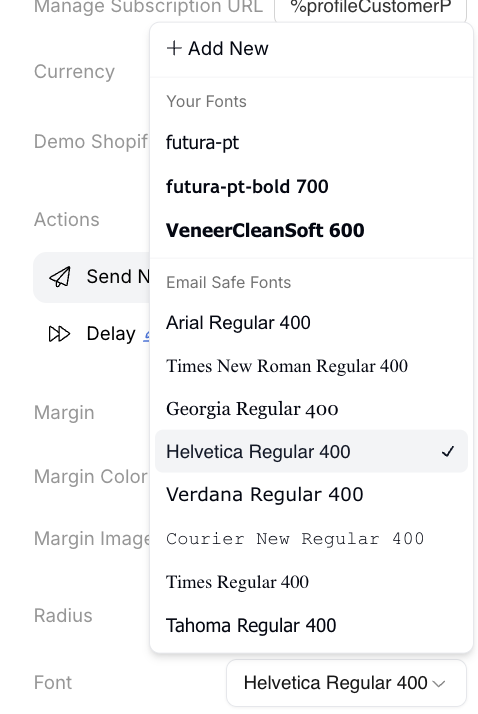
Adding fonts
If you want to use a font that was not auto-imported by Zaymo, you can select + Add New in the Font dropdown. This will pull up the Use Custom Font modal with two options for adding new fonts: Google Fonts or Import font.
The Google Fonts toggle allows you to select any web safe font.
The Import Font toggle allows you to enter a direct URL to a CSS file containing @font-face declarations (e.g., Adobe Fonts, custom font CSS).
Fonts sync for the entire account
Once Zaymo imports a font (either automatically by recognizing a font in an imported email or a manually added font), that font will show in the Font dropdown across the entire account.
At the moment, Zaymo does not support removing fonts.
Previewing fonts
Zaymo's previewer will accurately show fonts as if the email were opened in a real email client. Different email clients have different rules for font support, so the email may look slightly different depending on the preview settings.
Interactive emails do affect font support for Gmail (see known limitations below).
Known limitations
AMP limits font support on Gmail
For most email clients, font support for interactive emails is the same as font support for non-interactive emails. However, Gmail limits font support on all interactive emails to email safe fonts.
This means your entire interactive email on Gmail will always fall back to an email safe font.
Other email clients support most fonts.