How to use discounts in Zaymo blocks
Last updated: April 29, 2026
Zaymo uses discounts from Shopify (and Recharge, if connected) to pre-apply savings to in-email actions. This applies to blocks like the Product Block, Product Grid, Swap Up, and Reactivate.
You can search for existing discount codes or create a new percentage discount directly from the email builder. If your store uses both Shopify and Recharge, Zaymo keeps the same code available in both places so it works everywhere your recipients might redeem it.
Adding a discount to a block
Discounts are added from the discount trait on any supported block. From there you can:
Search for an existing discount code. Zaymo searches every connected provider (Shopify, and Recharge if it's connected). You can search by code, by title (where the provider supports titles), or by percentage value.
Select an existing code. If a matching code is found, click it to apply it.
Create a new percentage discount code. If your search doesn't return what you need, create a new code from the top of the dropdown. Pressing Enter selects the first option in the dropdown — when there's no match, that option is the create action.
Creating a new discount in Zaymo
When you create a discount from the email builder, Zaymo creates a percentage-off discount with the following defaults:
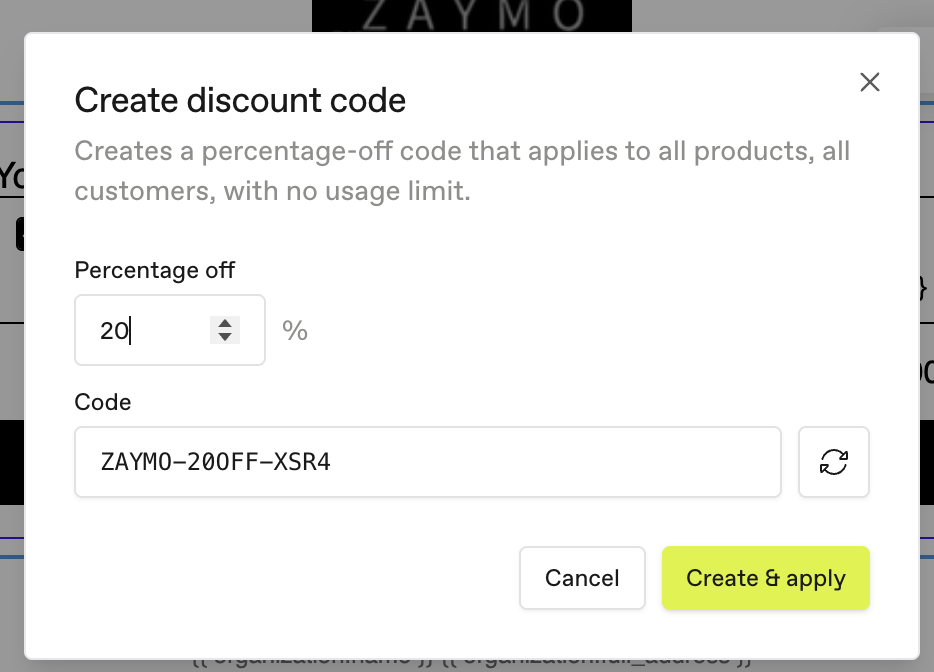
A default value of 10% off, editable before creation.
An auto-generated code like
ZAYMO-10OFF-ABCD. If you change the percentage before saving, the code updates to match (for example,ZAYMO-25OFF-ABCDfor 25%). Once you edit the code manually, Zaymo stops auto-updating it.The code is created in every connected managed provider (Shopify and, if connected, Recharge). There is no provider toggle — the goal is for the same code to work everywhere.
If one connected provider can't create discounts (for example, missing permissions), Zaymo blocks creation entirely rather than creating the code in only one place. This prevents you from sending an email with a discount that only works for some recipients or purchase paths.
Shopify permission requirement
Creating Shopify discount codes requires the Shopify write_discounts scope. If Shopify is connected without that scope, everything works normally until you try to create or clone a discount. At that point Zaymo will show a toast prompting you to reauthenticate Shopify. Reauthenticating requests the updated scopes, after which creating and cloning Shopify discounts will work normally.
Defaults for Zaymo-created Shopify discounts
Percentage product discounts, applied to all products
Available to all customers
Eligible for both one-time and subscription purchases
Active immediately
Limited to one use per customer
Allowed to combine with shipping discounts
Not allowed to combine with other order or product discounts
Defaults for Zaymo-created Recharge discounts
Percentage discounts, applied to all purchase item types
Enabled immediately
Available through API, checkout page, customer portal, and merchant portal
Not restricted to first-time customers
One charge only — the discount applies to the first eligible charge and does not keep applying on later recurring charges (set via Recharge's
max_subsequent_redemptions: 0)
Using a discount that already exists
When you select an existing discount code, Zaymo checks whether the code exists in every connected managed provider:
If the code exists everywhere, Zaymo applies it immediately.
If the code exists in only one provider, Zaymo opens a confirmation modal. You can clone the code to the missing provider, apply it without cloning, or go back to search. For example, a Shopify-only code can be cloned to Recharge, and a Recharge-only code can be cloned to Shopify. If multiple providers are missing the code, Zaymo will clone to all of them.
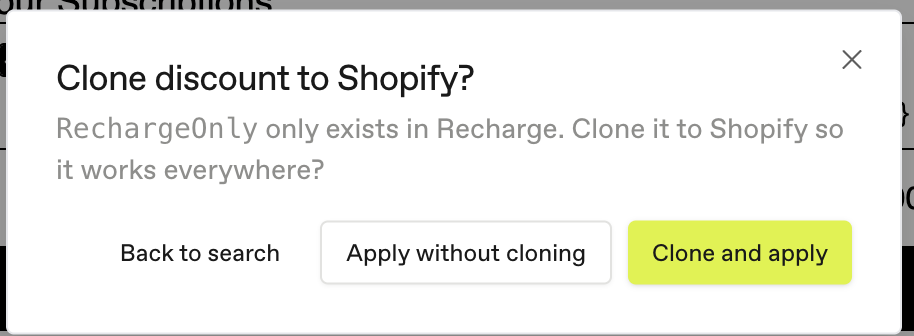
Zaymo only clones percentage discounts. Fixed-amount and shipping discounts may still be searchable or applicable when the connected provider supports them, but Zaymo will not copy them between Shopify and Recharge. If you try to clone one, the clone will fail and you can choose to apply the original code without cloning.
Editing display text
You can edit the display text shown for a discount in the email. This only changes what your recipients see — it does not change the underlying discount code or any settings on the provider side.
Common errors
If you see an error when adding a discount code to a block, the most likely causes are:
The code isn't live in Shopify. Confirm the code is active and applies to the products and recipients in question.
The code isn't synced with your subscription provider. If Recharge is connected, the code needs to exist in both places. Zaymo will offer to clone the code for you when possible — see Using a discount that already exists. For codes Zaymo can't clone (fixed-amount, shipping), you'll need to set them up manually in both Shopify and Recharge with mirrored configuration.
Missing Shopify
write_discountsscope. If you see a toast asking you to reauthenticate Shopify when creating or cloning a discount, complete the reauthentication flow to grant the updated scopes.
If a discount code is not applying to a recipient's account on the subscription platform, the most common reasons are:
The profile is not eligible for the discount.
The profile has already used the discount, and the code is limited to a single use per customer.
Known limitations
Discount creation and cloning
Zaymo can only create percentage discounts.
Zaymo can only clone percentage discounts. Fixed-amount and shipping discounts are not cloned between Shopify and Recharge.
Existing discounts created outside Zaymo may have different provider settings than Zaymo-created discounts.
Recharge and Shopify discounts are separate provider records, so keeping them in sync depends on Zaymo's create and clone flows. Codes added directly in one provider will not appear in the other until cloned.
Free shipping
Zaymo only supports free shipping discounts in the following use cases:
Subscription actions: Send now, Reactivate
Zaymo does not support free shipping on product actions (add item, create subscription).
Discount stacking
Only one discount code can be applied per block. A potential workaround is to use follow-up actions.
Reactivate block
If a discount only applies to some products in a subscription, the Reactivate block will display the price as if everything qualifies. When the order processes, the discount will only apply to eligible products.