Spin to win
Last updated: November 5, 2026
The Spin to win block lets your customers spin a prize wheel inside the email and win a prize. You choose what's on each slice, you can add a product image to each one, and you choose how likely each slice is to win. If your account has a subscription app connected, a winner can claim their prize with a single tap, right from the email.
This article covers how to build a wheel, how the odds work, how prizes are claimed, and what customers see in email clients that cannot run interactive content.
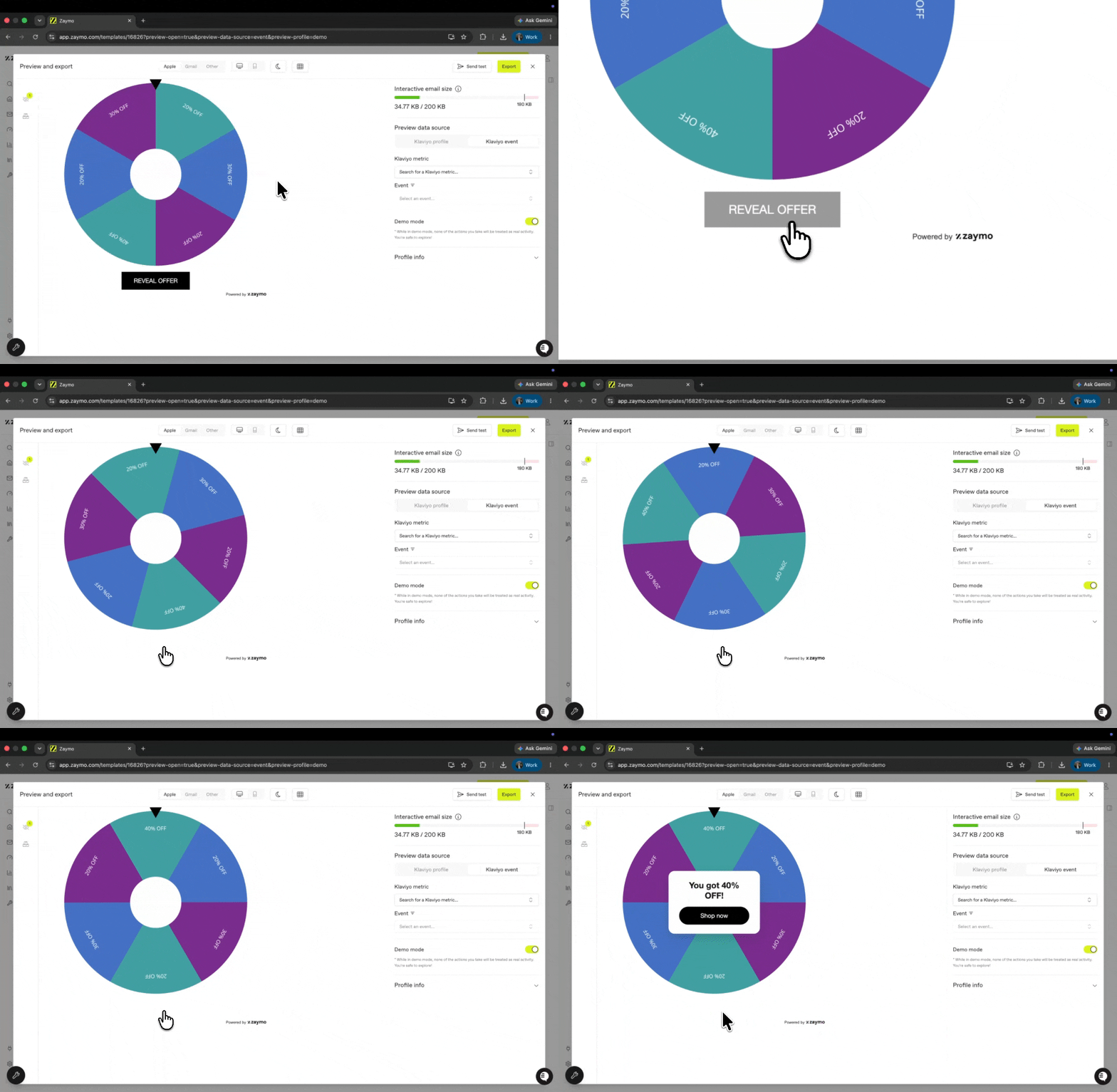
Build the wheel
Drag the Spin to win block into your email. You'll find it in the Gamification group in the block list.
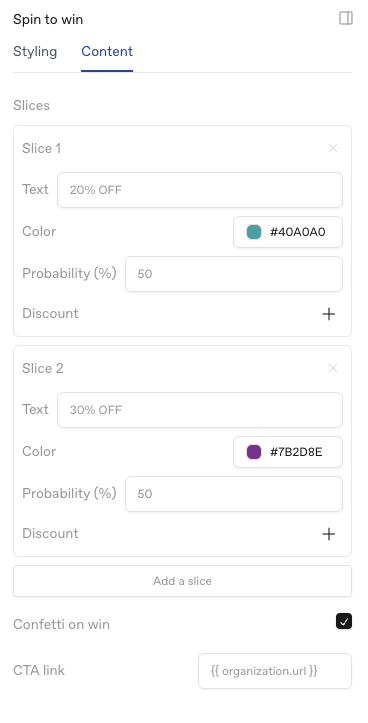
Add your slices. A wheel needs at least 2 slices and can hold up to 12. Click Add a slice to add one. Each slice has:
Text - what's written on the slice, for example "20% off"
Color - the slice's background color
Image (optional) - click Add image to put a product photo on the slice. Once it's added, Image size (%) makes it bigger or smaller, and Image position moves it toward the edge of the wheel or toward the center.
Probability (%) - how likely this slice is to win. See "How win probability works" below.
Action (optional) - the prize the customer gets when they claim it. See "Claimable prizes" below.
Design the Win screen. When the Spin to win block is selected, you'll see two tabs beside it on the canvas: Spin and Win. Click Win to see the card customers get after the wheel stops. It has:
A headline - "You got {prize}!" by default
A prize image - shows the image from the slice the customer landed on. Select it to turn it on or off with Show prize image, or change its Image height.
A custom image (optional) - want every winner to see the same graphic, like a coupon design, instead of the slice's image? Select the prize image and click Choose image under Custom image. Once it's set, it shows on every win in place of the slice's image, at the Image height you chose. Show prize image has to be on for it to appear. Click the × to remove it and go back to slice images.
A line of text under the image
A button - labelled Claim on new wheels. Select it to change the text or set its Link.
You can use
{prize}anywhere in the text and Zaymo fills in the winning slice's text.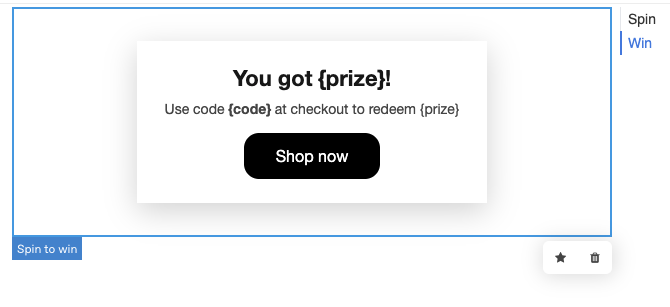
Set the win probability for each slice. See the next section.
Optional: turn on Confetti on win.
How win probability works
You set a probability on each slice, and Zaymo weighs the wheel accordingly.
Aim for a total of 100%. Under the slices, the panel shows a running total. It turns green when every slice has a number and they add up to 100. If they don't, it shows in red. Click Distribute evenly to clear the numbers and give every slice the same chance.
Every slice needs a probability, or none of them do. If you set probabilities on some slices and leave even one blank, Zaymo ignores all of them and every slice becomes equally likely. So if you're weighting the wheel, fill in every slice. (If your numbers are filled in but don't add up to exactly 100, Zaymo still scales them proportionally, so 25, 25, 25 behaves like 33, 33, 33.)
A slice set to 0 will never come up. That's useful if you want to keep a prize on the wheel for appearances without ever awarding it.
Each customer gets the same result every time they open the email. The outcome is worked out from the recipient, not at random on each open, so a customer can't reopen or reload the email to get a better prize. It's also the same whether they spin in Gmail, in Apple Mail, or on the hosted page.
Claimable prizes
If your account has a subscription app (like Recharge, Skio, Stay AI, Loop, or Ordergroove) connected, each slice has an Action field. Pick an action - for example applying a discount to the customer's subscription or adding a free gift to their next order - and that's the slice's prize.
When a customer lands on that slice, the Claim button on the Win screen runs the action for them. One tap, no code to copy. They see a confirmation once it's done.
A few things to know:
Each prize can only be claimed once per customer. Tapping Claim again, or opening the email again, won't award it twice.
The Win screen needs a button. If a slice has an action but the Win button has been removed or has no text, the panel shows "Add a Win button so winners can claim."
Not every action can be a prize. Swap Up, HTTP request, and Reactivate from Recharge actions aren't offered on slices.
No Action field? That means your account doesn't have a subscription app connected. See Using Zaymo with different subscription providers.
Slices without an action still work - the Win button just links to wherever you set it.
Wheels built before October 2026
Older wheels with a discount code on a slice keep working exactly as before. You'll see the code shown on the slice as Discount, and {code} on the Win screen still fills in that code. You can remove the code with the × next to it, but new codes can't be added this way - use an Action instead.
Making some customers win nothing
Yes, you can do this, and it's a common setup. Add a slice with no action on it, give it whatever text you want, for example "Not this time", and give it a probability like any other slice.
What the customer sees
The wheel spins for about four seconds, turning five full times before it slows and stops on the result. Then the Win screen appears with the prize, the prize image (or your custom image) if you turned it on, and the button.
In email clients that cannot run interactive content
Not every inbox supports interactive email. In those clients, Zaymo shows a still image of your wheel with a Spin to win button underneath it. Tapping it opens a hosted page where the customer spins the wheel for real, gets the same result they would have got in the email, and can claim their prize there.
For background on this behavior across all blocks, see Parts of an interactive email: interactive vs fallback.
Good to know
A wheel with no slices on it won't render. Zaymo removes the block from the email rather than send an empty space, so make sure every Spin to win block has its slices filled in.
Interactive blocks add to your email's size, and slice images add a little more. If you're close to the limit, see How do Zaymo blocks affect email size?