Custom button
Last updated: October 29, 2026

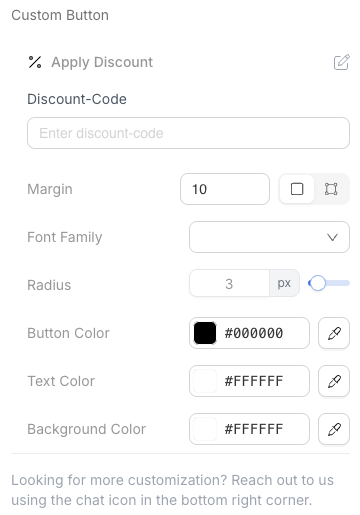
The custom button is no longer in the block list, but custom buttons already in your emails keep working. To add a new button that takes action on a customer's account, use the Action button block. It works with every subscription provider listed below, including Loop, and has many more actions: delay a subscription, send the next order now, add a product (recurring, one time or as a free gift), reactivate a cancelled subscription, swap up, or apply a discount. Which actions you can pick depends on your subscription provider.
The custom button is a simple button meant to take action on a customer's account. Today, the only supported action is applying a discount.
Want another action supported? Let us know!
Known limitations
Custom Action buttons can only target a single subscription at a time. They cannot perform bulk operations, such as reactivating all of a customer's canceled subscriptions in one click. For reactivating multiple products or subscriptions at once, use the dedicated Reactivate block instead, which is specifically built for multi‑item/subscription reactivation scenarios.
Availability by subscription provider
Subscription Provider | Custom button available? |
Recharge | ✅ |
Skio | 🚫 |
Stay.ai | 🚫 |
Ordergroove | 🚫 |
Loop | 🚫 |
Custom | ✅ |