Upcoming order / billing reminder: best practices
Last updated: July 3, 2026
Goal: Reduce churn and increase AOV with upsells and cross-sells
Blocks:
Why the upcoming order?
The upcoming order reminder is a delicate moment in a subscriber's journey. Often, reminding someone that their subscription exists increases the likelihood of churn. With Zaymo's subscription portal, you can take advantage of this touchpoint to mitigate churn and increase AOV.
Typically, well-implemented Zaymo billing reminder emails:
Decrease churn ~20%
Increase cross-sells ~50%
What you'll be building:
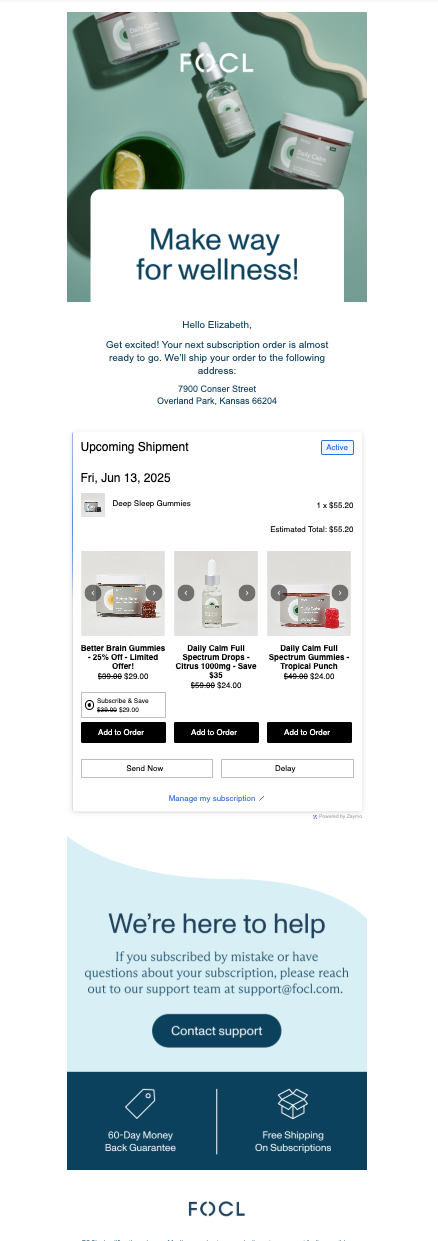
Implementation Guide (SOP)
Create your non-interactive template in Klaviyo
This template will be used as a fallback for customers who aren't able to view interactive emails.
Set up your flow with the appropriate trigger(s)Each subscription provider has its own specific trigger for the upcoming order email.
For example:Order upcoming on ReCharge
Skio: Billing Reminder Notification
Retextion - Order Upcoming
Build in Zaymo
Import your template from Klaviyo into Zaymo
Add the Zaymo block(s) into the email
Delete any repetitive or non-applicable elements
For example, you'll want to delete the dynamic blocks with upcoming order items which are now being shown using the subscription portal block
Customize the block to match your brand
Configure purchase options for your product block upsells:
Use Add one-time to add the item to the customer's next subscription order as a one-time purchase
Use Create one-time order for a separate standalone purchase
Use Add to subscription or Create new subscription if you prefer recurring subscription add-ons instead
Export back to Klaviyo
Click on "Preview / Export"
In the previewer, view the email and ensure that it looks as expected on desktop vs mobile, and Apple vs Gmail. You can also send yourself test emails to review
Once you're satisfied with the appearance, export the template to Klaviyo
If you'd like to run an A/B test, export the template as an A/B test. More info here: 📄 How to use a Zaymo in-template A/B test
Add your new template into the flow
Important: The subscription portal only shows the next upcoming order. For customers with multiple subscriptions, only the products in the immediate next order can be swapped or modified. Set clear expectations in your email copy to avoid confusion.
Examples & best practices
Need ideas?
Example emails using the subscription portal
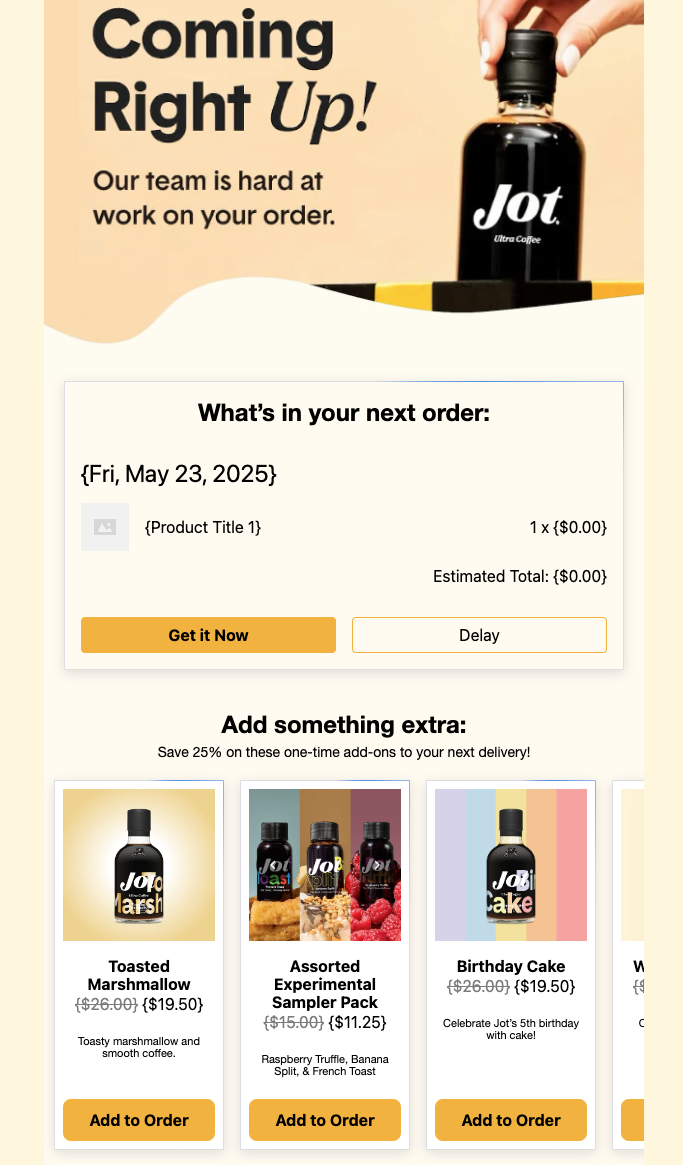 | Use the 'Delay' button to keep customers away from cancelling Breaking up the subscription portal into multiple pieces can improve your design Carefully select your upsells. Most brands have specific products that are more suitable for upsells than their bestsellers |
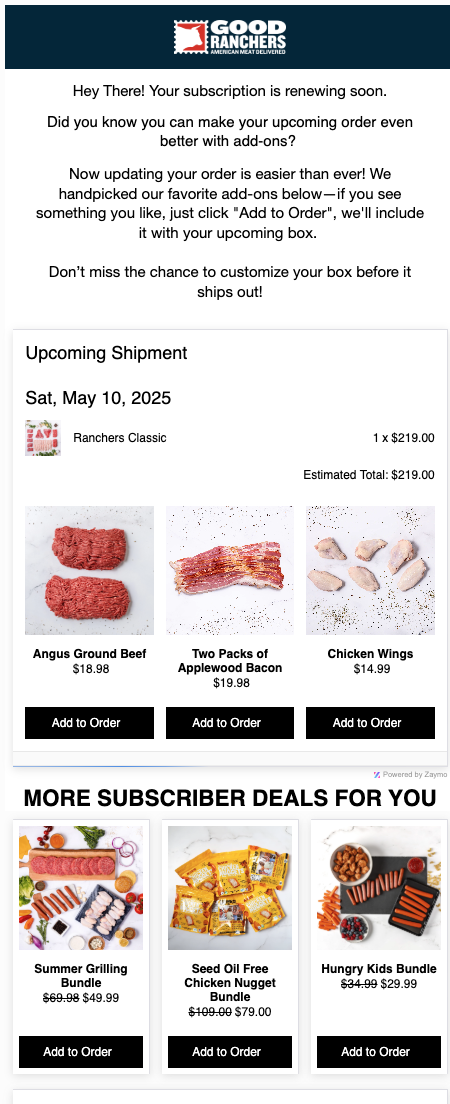 | Keep the portal high in the email. Your #1 intended action should be the first CTA you present to customers The product grid will hide products a customer already has in their order; be sure to include at least 4-5 products on the carousel so you have backfills Pulling in a dynamic collection allows you to test different upsells without the need to re-export from Zaymo |
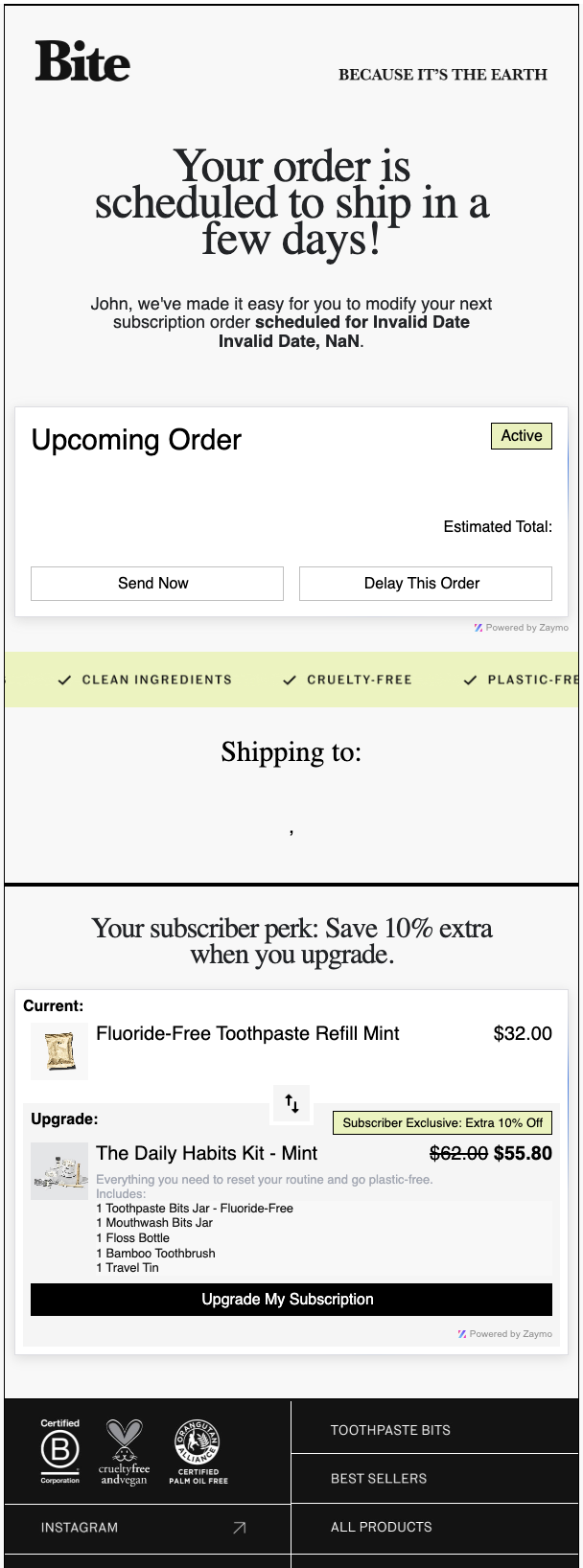 | Swap ups may be a good substitute for upsells, depending on your intended customer journey Combine swap-ups and cross-sells using conditional logic Plan swaps and cross-sells can be kept in the same rebill template. Use conditional logic on the blocks (e.g. by product, selling plan, or tags) so the correct swap or cross-sell appears based on the customer's subscription. Note: With multiple interactive blocks, email size can get large quickly. Monitor the email size as you build out the template. Applying even a small discount can drastically increase uptake on in-email offers |
Measure results
The billing reminder affects several metrics that you should care about. Consider which one(s) you are focusing on.
Below are some metrics that we regularly see Zaymo help with. You can view the effect both in Zaymo and in Klaviyo. However, we recommend running a Zaymo A/B test to get the most comprehensive in-email action data.
Zaymo actions / events to track
Zaymo add one-time | Tracks the number of in-email add-ons that are successfully added to an upcoming order |
Zaymo add to subscription | Tracks the number of in-email recurring add-ons successfully added to an upcoming order |
Zaymo delay | Tracks the number of order processing delays that happen in the email |
Zaymo send now | Tracks the number of accelerated orders that happen in the email |
Non-Zaymo actions / events to track
These metrics measure all actions taken place by your actions--not necessarily taken via a Zaymo block. Tracking the difference in these actions often shows the incremental lift Zaymo causes. They're most relevant for A/B tests.
[Your subscription app] cancelled subscription | Zaymo typically lowers the cancelled subscription rate. This number is much more useful in an A/B test and is less meaningful on its own |
[Your subscription app] one-time product added | Zaymo's add one-time purchase option adds an item to the next order via your subscription app. Most subscription apps send a Klaviyo event that tracks these outcomes |
[Your subscription app] subscription started | Zaymo's add to subscription purchase option typically creates a new subscription that gets bundled in with the upcoming subscription order |
[Your subscription app] send now | Measure the change in the number of people who accelerate their order |
[Your subscription app] change charge date or delay | Consider checking how many subscriptions were started that are attributed to this email. Especially if your primary CTA is to start a subscription, this metric will be relevant |