How to use a Zaymo in-template A/B test
Last updated: July 3, 2026
Zaymo's in-template A/B test lets you test the interactive version against a control with just the click of a button.
Unlike an A/B test in Klaviyo where you create two different email templates, a Zaymo A/B test runs inside of a single email template--no conditional split in a flow or A/B test in a campaign required. Your Klaviyo flow structure can remain as-is and the test will function properly. The Zaymo email template is smart and will randomly show the non-interactive version to 50% of the population.
The results of the A/B test are shown in Zaymo's analytics page.
Do not use a Zaymo A/B test inside of a Klaviyo A/B test. That will result in the interactive email being sent to only 25% of the population.
Why use a Zaymo A/B test?
Engagement data - Zaymo A/B tests track in-email engagement. Klaviyo can only track link clicks
Ease of use - The test happens within a single template. No need to set up separate messages in Klaviyo
Note: Zaymo A/B tests only compare the interactive email content against the original Klaviyo version. To test subject lines or preview text, you must use Klaviyo's native A/B testing features.
When to use Zaymo A/B test vs. Klaviyo split
Use Zaymo's native A/B test when:
Testing a Zaymo-enabled template against a non-Zaymo version
You need visibility into in‑email engagement (clicks + interactive actions)
You want A/B results consolidated in one place
Use a Klaviyo split when:
Comparing two fully Zaymo‑enabled variants
The native Zaymo A/B test is recommended for testing Zaymo vs. non‑Zaymo templates because it avoids Klaviyo's attribution blind spots for in‑email actions and provides richer engagement data.
How do I choose the control and treatment content?
A/B tests test the incremental change from changing one variable, so they require both a control and a treatment version.
Control email in the A/B test
The control in this test is simply the fallback version of the email. At the moment, you cannot edit the fallback version of the email in Zaymo. Instead, the fallback version of the email is the original template you import from Klaviyo.
Treatment email in the A/B test
The treatment version of the email is the email you built with the Zaymo block.
How do I set up the A/B test?
Setup
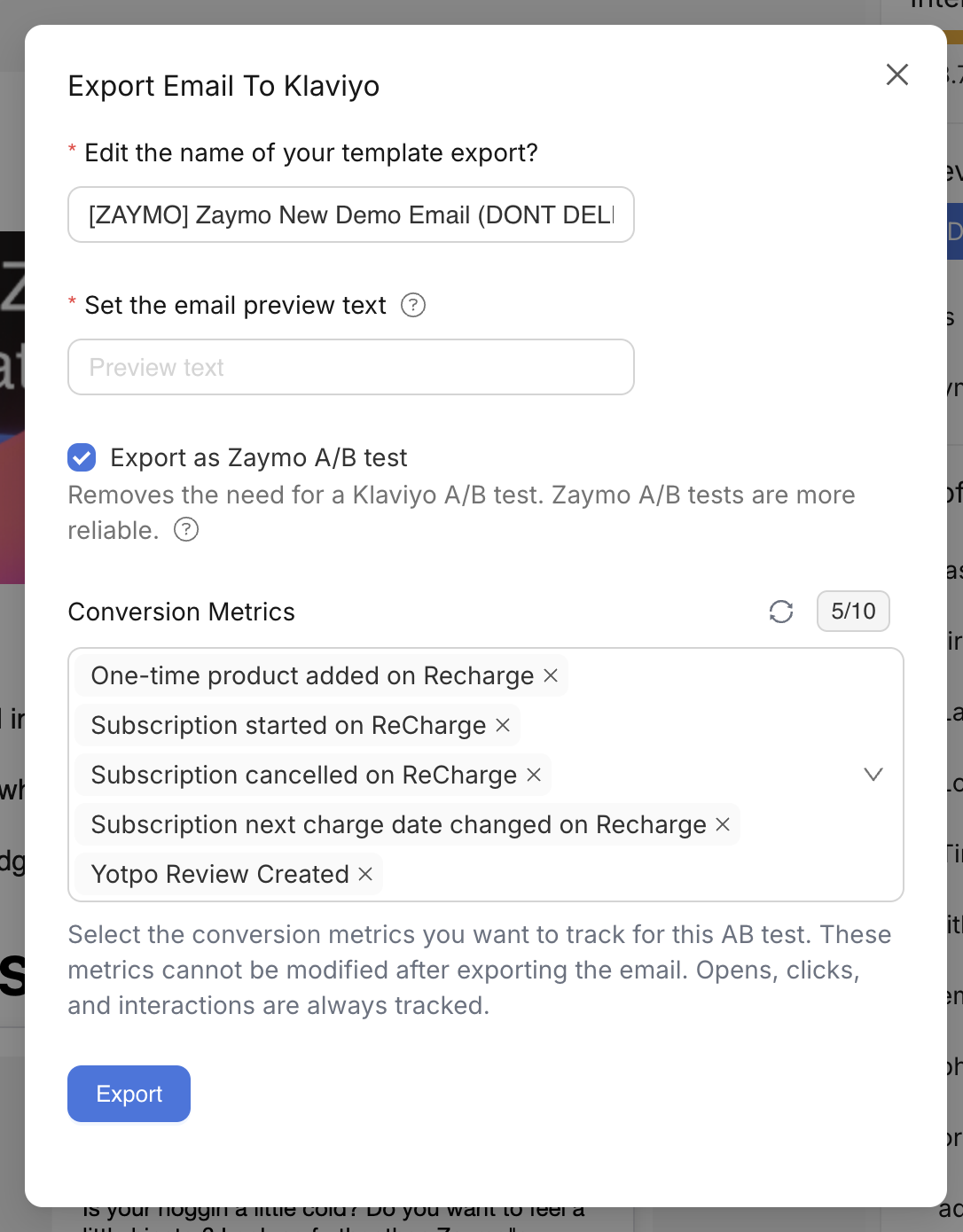
When you click Export in the Zaymo template previewer, you will be shown the export modal. In this modal, select Export as Zaymo A/B test.
Choose the relevant conversion metrics you want Zaymo to track during the test. Then, click Export. You're ready to go!
How do I measure the results?
Choose relevant conversion metrics
Zaymo can only track the Klaviyo metrics you choose before exporting. So, think carefully about the metrics that are relevant to the email your are sending. Zaymo will recommend some default metrics depending on the blocks used, but it is ultimately up to you to make sure the metrics are relevant.
Important limitation for discount‑based A/B tests: if your test includes discount codes, Zaymo mimics the discount effect rather than triggering the actual Shopify discount codes. This means traditional Shopify coupon code tracking won’t work; instead, rely on the Klaviyo conversion metrics you select during export setup to accurately track the success of discount‑based campaigns.
See results in Zaymo analytics dashboard
Once the email is live in Klaviyo, you can track the outcome in the message analytics page.
The Zaymo Analytics page shows interaction data for Zaymo elements (clicks and in‑email actions on dynamic blocks) plus basic message context. For full send/open metrics and non‑Zaymo link clicks, refer to Klaviyo's analytics dashboard.
You can identify an email as part of an A/B test by checking the analytics page. Next to the template title, a test tube icon labeled "A/B" indicates that an A/B test is currently active for this email. How to view which version won the test?

How do I turn off Zaymo A/B tests?
Zaymo A/B tests cannot be turned off from in Zaymo. Instead, simply re-export the same template from Zaymo without selecting Export as Zaymo A/B test.