Cloning or deleting an email in a flow
Last updated: November 5, 2026
You can copy or remove an email in one of your Klaviyo flows right from Zaymo's flow page. You don't need to jump into Klaviyo's flow editor to do it.
The most common reason to clone is to try out changes on a copy of a flow email, without touching the one that's already sending.
Where to find it
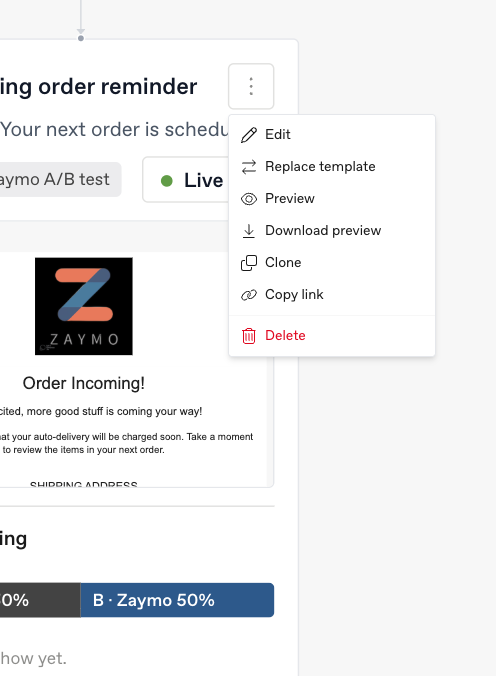
Open Flows from the left sidebar in Zaymo and click into the flow you're working on.
Find the email in the flow diagram and click the three dots on its card.
Choose Clone or Delete.
Cloning an email
Choose Clone from the email card's three-dot menu. The Clone email window opens.
Give the copy a name. Zaymo fills in the original name with "(copy)" on the end, but it's worth renaming it to something you'll recognize later. Two emails with nearly the same name are hard to tell apart in the diagram a week from now.
Click Clone email.
Zaymo adds the copy as a new draft email right after the original in the same flow, with the same content and settings. Because it's a draft, it doesn't send to anyone until you set it to Live, either from the status on its card in Zaymo or in Klaviyo.
While it works, the window shows each step as it happens (Creating the email in Klaviyo, Adding it to the flow), so you can see it's making progress. Keep it open until it finishes. It closes on its own once the new email shows up in the diagram.
If the original is a Zaymo email, the copy gets its own Zaymo template. That means editing the copy never changes the original, and editing the original never changes the copy. This takes a few extra seconds, which is why you'll also see a Publishing its own Zaymo copy step.
Deleting an email
Choose Delete from the email card's three-dot menu. The Delete email window opens.
Read the confirmation and click Delete email.
The email is removed from the flow in Klaviyo, and the steps before and after it connect to each other automatically.
A few things to know before you delete:
If the flow is live, anyone currently waiting on that email moves on to the next step in the flow. The confirmation window reminds you of this.
Your Zaymo content is not deleted. Only the step in the Klaviyo flow is removed.
There's no undo from Zaymo. If you delete the wrong email, you'll need to rebuild it.
When these options don't appear
Only emails can be cloned or deleted here. SMS steps, time delays, and other flow steps don't show these options.
A/B test steps work a little differently. If a flow step is a Klaviyo A/B test, its card lists each version. You can clone a single version from that version's own three-dot menu, but you can't delete a version, or the whole test, from Zaymo. Do that in Klaviyo. The winning version of a finished test can't be cloned either.