Adding dividers and spacers to your email
Last updated: November 5, 2026
You can add a line between sections (a Divider) or a block of empty space (a Spacer) right in Zaymo's email builder. They have the same styling options as Klaviyo's own divider and spacer blocks, so your Zaymo emails can match the rest of your Klaviyo designs.
Add a divider or spacer
Open your email in Zaymo's builder.
In the left panel, click the Standard tab.
Drag Divider or Spacer into the email wherever you want it.
Click the block to change its settings in the right-hand panel.
You can move, copy, or delete them like any other block.
Divider settings
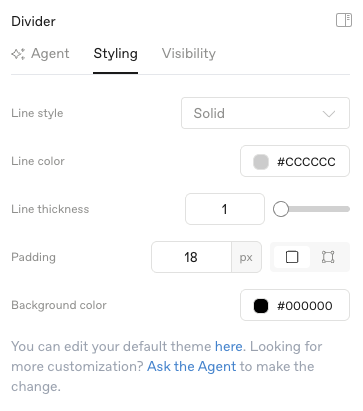
Setting | Options | Default |
Line style | Solid, Dashed, Dotted | Solid |
Line color | Any color | Light gray (#CCCCCC) |
Line thickness | 1 to 8 px | 1 px |
Padding | Space above, below, and on each side of the line | 18 px on all sides |
Background color | Color behind the line | None (transparent) |
The line always runs the full width of the block. To make it shorter, increase the left and right padding.
Spacer settings
Setting | Options | Default |
Height | 0 to 200 px | 20 px |
Background color | Color of the empty space | None (transparent) |
Both blocks also have the usual Device visibility setting in the Visibility tab, so you can show them only on desktop or only on mobile.
Emails converted from Klaviyo
When you convert a Klaviyo email into Zaymo, any dividers and spacers from Klaviyo come in as Divider and Spacer blocks you can edit with the settings above. Ones with unusual styling Zaymo doesn't offer (for example, a double line or a line thicker than 8 px) come in as they are, but you can't change them with these settings.
If your email syncs to Klaviyo as a drag-and-drop template, changes to existing dividers and spacers (color, thickness, height, and so on) carry back to Klaviyo, and deleting one in Zaymo removes it in Klaviyo too.
One thing to know: a new divider or spacer that you add in Zaymo isn't added to the Klaviyo drag-and-drop version of the email when it syncs. Zaymo shows a message letting you know it wasn't added. New dividers and spacers, like new text and images, only travel to Klaviyo when Zaymo creates a brand-new Klaviyo template for the email.
Using AI
You can ask the Agent (the Agent tab in the builder's right-hand panel) to add or change dividers and spacers too, for example "add a dashed gray divider above the product block" or "make the space under the header 40px."